
BLOG
Learn how legacy DAST tools aren’t enough for the evolving security demands of mobile apps, and automated dynamic application security testing is the future.

.png)


BLOG
 15 Mins Read
Dynamic Application Security Testing (DAST) is an advanced scanning method that tests the production environment and analyzes application security at runtime. This type of black box testing identifies real-world vulnerabilities externally without much need for insights into the product's provenance of any single component.
This approach is essential for organizations to strengthen their application security, ensure compliance, and protect against evolving cyber threats.
By simulating real-world attacks in your system, DAST identifies critical security gaps that other vulnerability assessments and static methods might miss. This miss is the difference between a secure application and a leaky bucket, which can result in:
You can only understand its partial security posture without testing your application at run time. This will blind you to specific vulnerabilities that are apparent only during interactions between various system components in the live environment, leading to a false sense of security.
So, dynamic application security testing is more operational and behavioral. It helps identify problems during use and traces them back to their software design origins.
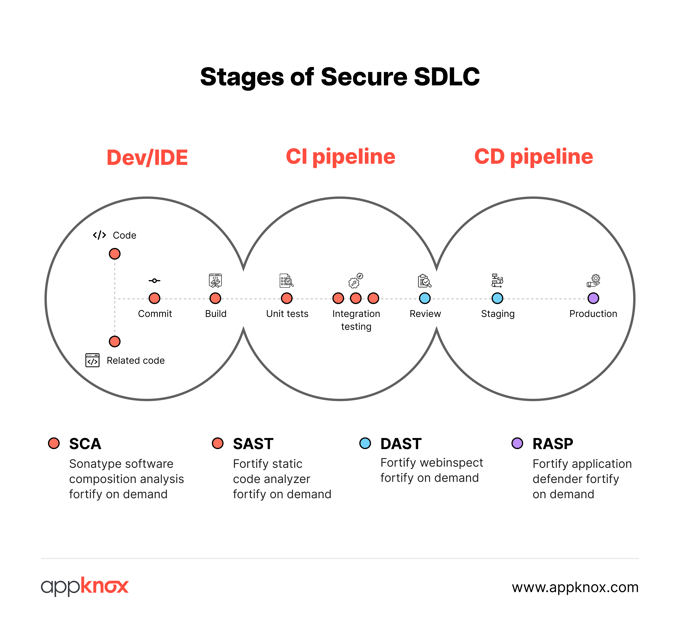
Furthermore, DAST is technology, language, and platform-agnostic.
By closely monitoring the application’s behavior under attack, DAST helps identify security vulnerabilities that hackers might exploit, such as:
While static application security testing (SAST) examines the source code, DAST simulates real-world attacks to uncover vulnerabilities that malicious actors could exploit.
There are five key advantages to DAST:
To maintain the efficiency of these benefits, DAST demands ongoing monitoring, which can become time-intensive.
Appknox addresses this by offering automated DAST, which simulates real-time user interactions to test applications efficiently.
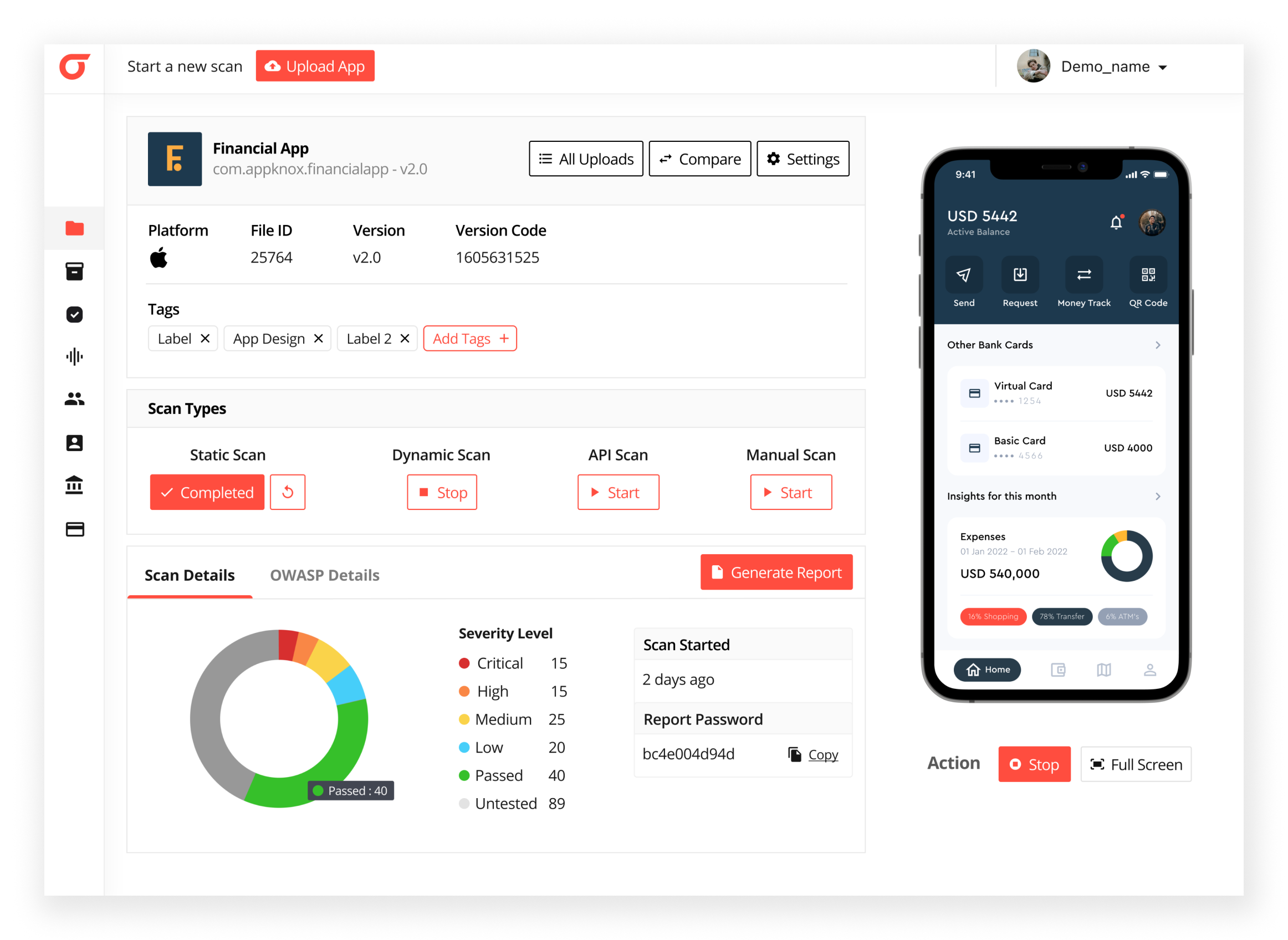
The tool helps detect and mitigate security vulnerabilities early, making it the most effective automated dynamic application testing tool in the application security domain.
Traditional DAST tools have helped identify applications' vulnerabilities, but have notable limitations.
Since they haven’t incorporated new technologies like AI, machine learning, and automation, they fail to improve DAST tools' accuracy, efficiency, and contextual awareness. This renders the traditional tools ineffective in identifying vulnerabilities in modern, complex applications.
Traditional DAST tools rely on crawling through applications by following links and forms. This means they may miss vulnerabilities in hidden or restricted areas of the application that are not accessible through these navigational paths.
DAST tools can sometimes produce false positives (reporting non-vulnerabilities) or false negatives (missing actual vulnerabilities), which leads to inefficiencies. Security teams must manually verify and filter the results.
Traditional DAST tools may not understand the application's business logic or user roles, resulting in less relevant and actionable findings.
As applications have become more complex and use a broader range of technologies, traditional DAST tools have struggled to keep up with newer vulnerabilities.
The growing need for automation in security testing is particularly relevant for DAST, which can be time-consuming and manual. Automating DAST drastically reduces the time and effort required.
The threat landscape is constantly changing, with new attack vectors and techniques emerging. Traditional DAST needs to adapt and incorporate new capabilities to keep up with these evolving threats.
Traditional DAST tools struggle to effectively test applications that require user authentication and complex session handling. This is a significant limitation, as many modern applications rely on these security mechanisms.
Traditional DAST is where runtime testing can significantly strain the application and its associated resources. DAST tools are also typically unable to analyze the flow of data within the organization, which can lead to security lapses in data silos.
Traditional DAST fails to provide comprehensive security testing for APIs, which are increasingly common in modern applications. DAST is typically conducted in the later stages of the software development lifecycle, so vulnerabilities are identified and fixed less efficiently than if found earlier.
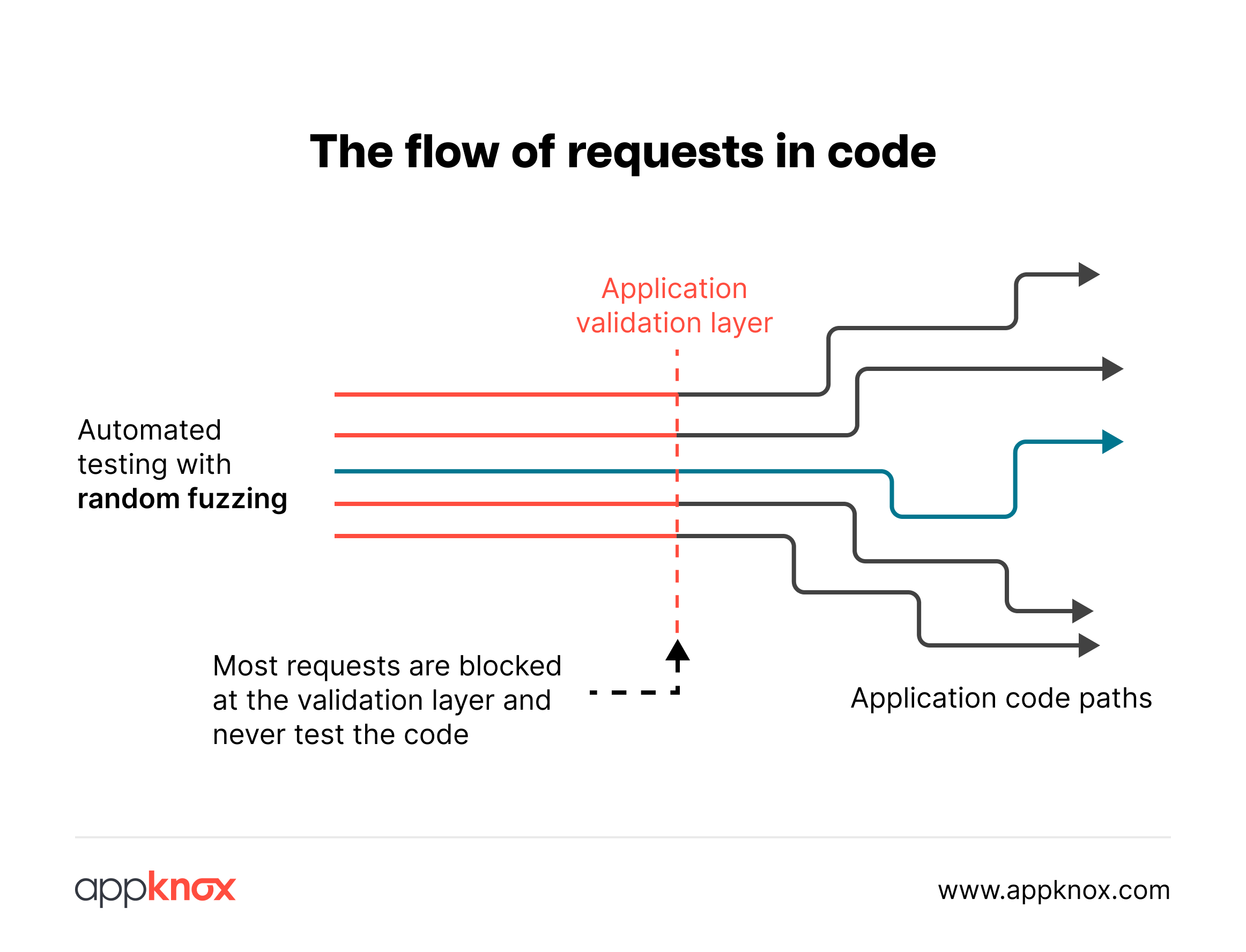
Dynamic testing only delivers value when it reflects how mobile apps behave in the real world.
Unlike web applications, mobile apps introduce runtime behaviors that traditional DAST tools often overlook.
Mobile apps rely heavily on:
Short-lived tokens and refresh workflows
Device-bound authentication and session state
API calls triggered by background services, not just UI actions
SDK-driven network behavior that never touches the frontend
Dynamic analysis for mobile apps must account for these realities. Otherwise, scans may run successfully but still miss the most exploitable runtime issues.
Before running a dynamic scan, teams must confirm that:
The app build used for testing matches production behavior
Authentication flows can be exercised programmatically
Environment-specific APIs (staging vs production) are correctly mapped
Security controls like certificate pinning or root detection don’t block legitimate testing
Misconfigured setups are among the most common causes of incomplete or misleading DAST scan results.
A reliable DAST setup should validate:
Network traffic visibility at runtime
Successful traversal of authenticated and unauthenticated flows
Proper handling of redirects, retries, and session expiration
If these aren’t confirmed early, teams end up debugging scan failures instead of analyzing real risk.
Dynamic Application Security Testing (DAST) analyzes running applications to find security vulnerabilities by simulating real-world attacks. It doesn’t require access to source code but interacts with the application as an external user would.
The process typically involves:
Since DAST operates in a runtime environment, it effectively identifies security flaws that only appear during application execution.
Integrating DAST into your security strategy ensures continuous protection against evolving cyber threats.
Planning infrastructure for dynamic testing
Effective DAST starts with planning the right runtime environment. Teams need infrastructure that mirrors real application behavior, including staging or pre-production instances, exposed endpoints, and stable network access. Planning infrastructure for dynamic testing also means setting up test credentials for authenticated scans, handling session management safely, and allowing controlled traffic so scanners can exercise business logic without disrupting users. When this foundation is in place, DAST findings reflect real risk rather than theoretical exposure.
When it comes to DAST, we know that a functional and running app is the best place to check its effectiveness because DAST can encounter functional issues while the app is in the testing environment due to constant changes. This makes staging and production environments the perfect running grounds for DAST, and this is where one can reap the maximum benefits out of it.
It is generally recommended that DAST in CD be automated by triggering scans during staging itself. After completing unit tests and SAST, you should trigger your DAST scan automatically.
You can also customize your flow based on your needs. How you proceed with this purely depends on your risk-taking ability, company policies, and the type of your application.
Based on your security requirements, it is recommended that you schedule periodic DAST scans. Since these tests take a while to complete, starting them at night, after a day of work, is recommended.
To run scheduled tests successfully and maintain the health of your pipelines, it is better to create separate pipelines instead of integrating them into the staging pipelines.
The best practices for automated dynamic application security testing (DAST) ensure that the testing process is thorough, efficient, and effective in identifying and mitigating security vulnerabilities.
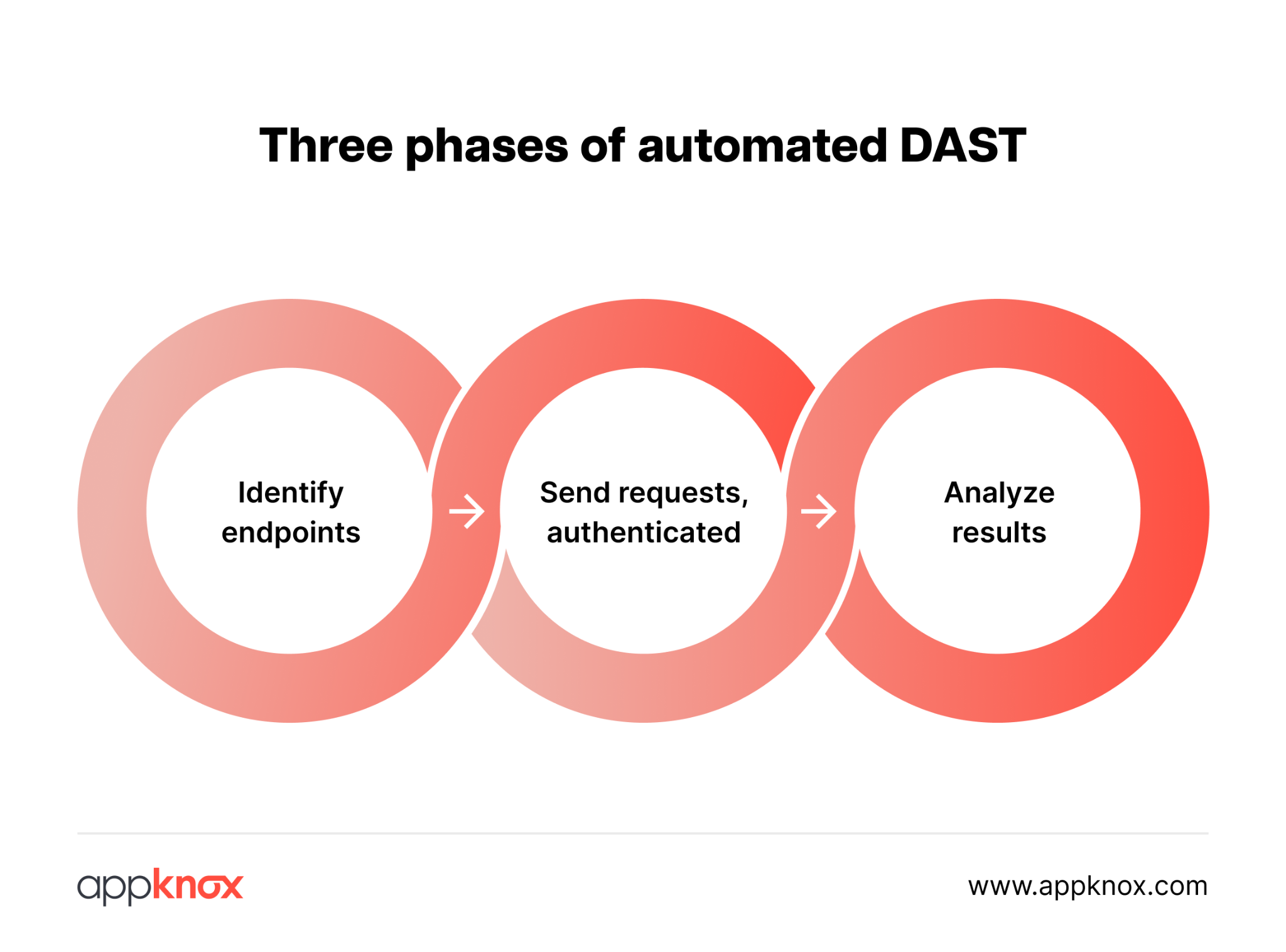
Developers assess vulnerabilities identified in scans, validate findings to minimize false positives, and collaborate with security teams to ensure effective resolution and ongoing security improvements.
Sure, open-source security frameworks can help you get started with the security analysis of your first application, but they lack the following:
Given the time and effort required to test multiple applications, the quality of open-source application security tools still lacks commercial value.
Check out why you should opt for a MobSF alternative for comprehensive security coverage of your portfolio of applications.
DAST runs your application and analyzes it for vulnerabilities, ensuring it is secure even before deployment.
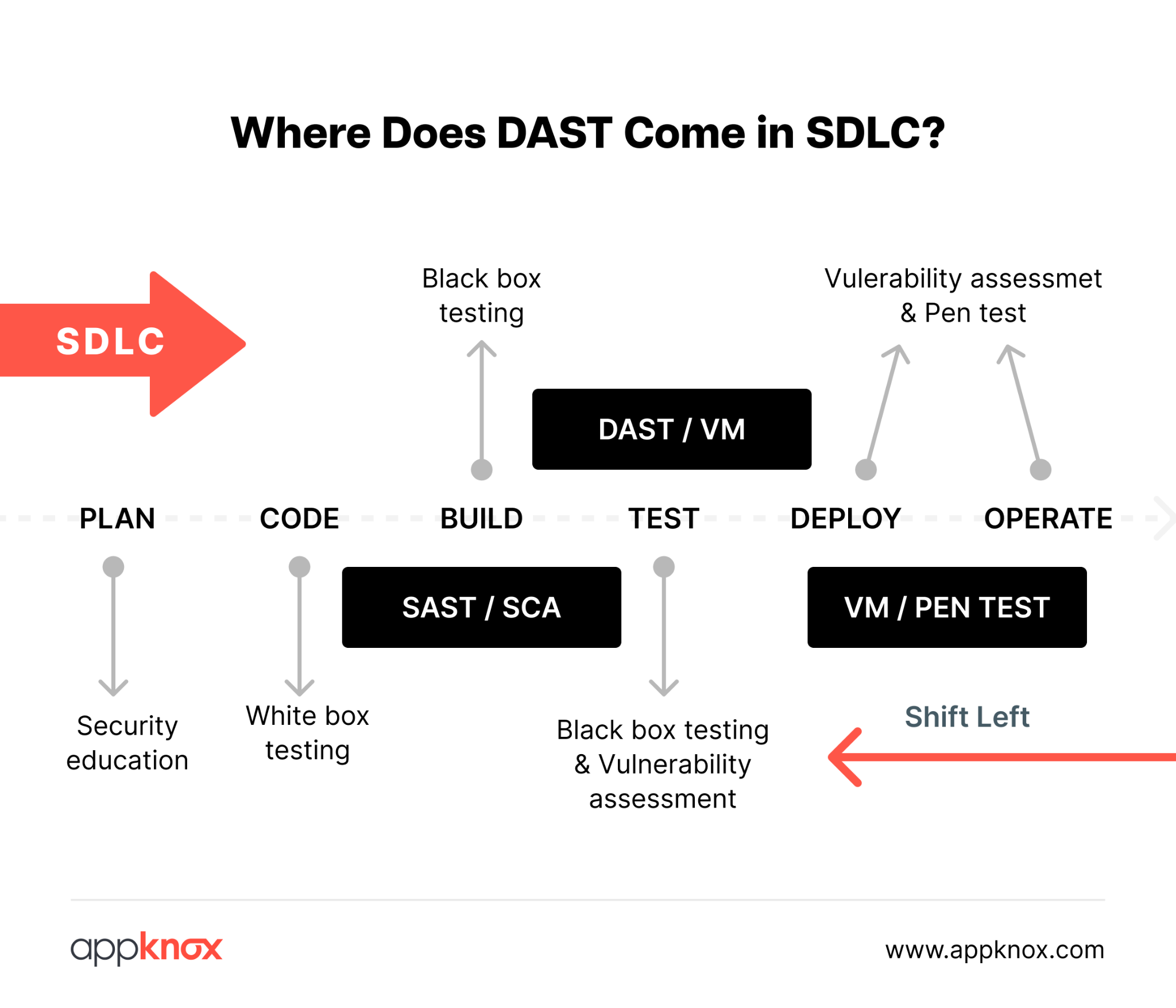
When integrated into DevSecOps, DAST prioritizes security equally, ensuring that applications are functional and safe from potential threats.
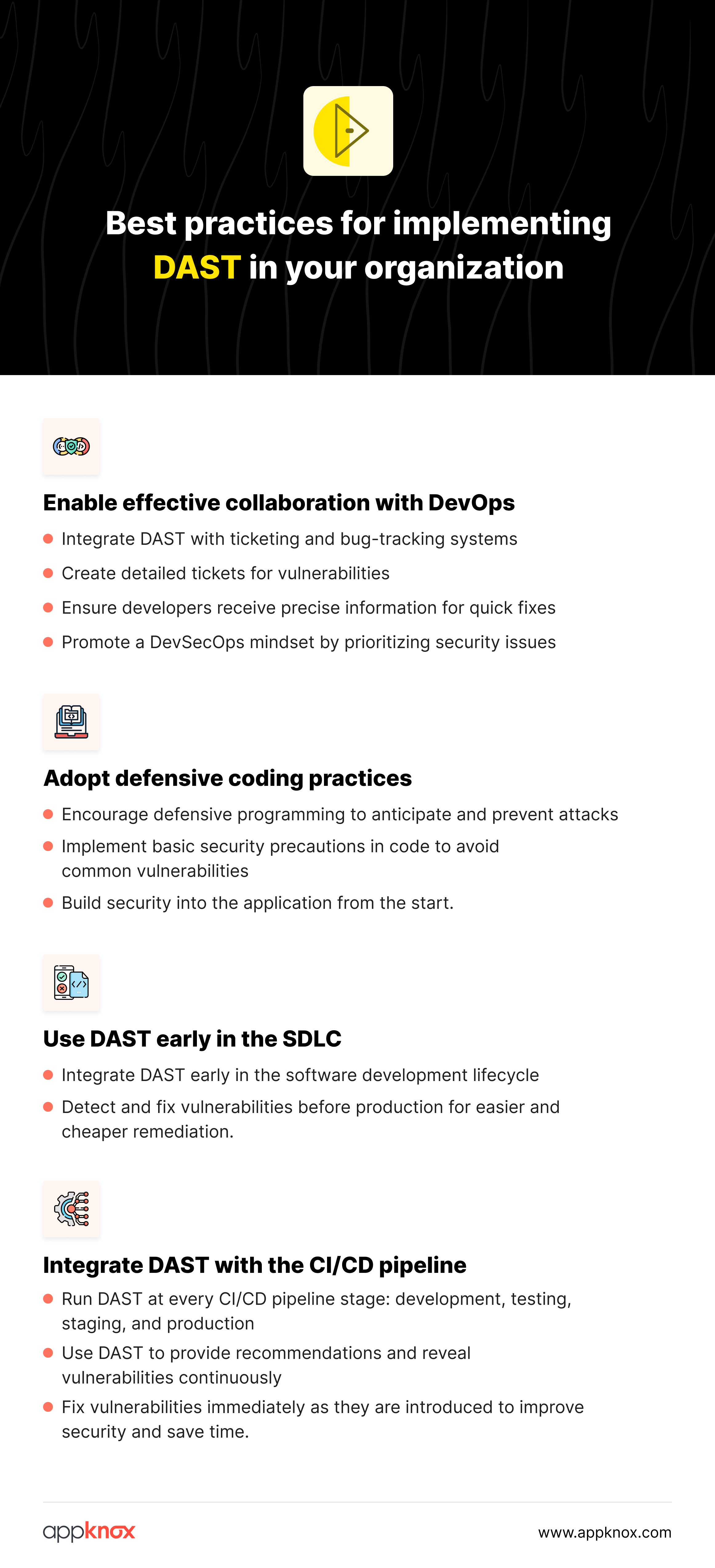
Easy to access dashboards to monitor DAST results
Once scans run continuously, visibility becomes critical. Security and engineering teams should be able to open a dashboard to monitor DAST results in real time, track newly introduced vulnerabilities, and observe how issues evolve across builds. A centralized dashboard helps teams review severity trends, identify recurring runtime weaknesses, and confirm whether fixes applied in recent releases have actually reduced exposure. This closes the loop between testing, remediation, and validation.
DAST becomes operationally useful only when it can run reliably and repeatedly inside delivery pipelines.
In real-world DevSecOps environments, this means dynamic testing must be designed to integrate seamlessly with CI/CD workflows; not operate as a slow, standalone security gate. When implemented correctly, automated DAST provides consistent runtime visibility across releases while preserving developer velocity and pipeline stability.
Modern DevSecOps teams trigger dynamic scans:
On merge to protected branches
Before release candidates are promoted
Periodically against production-like environments
This ensures that runtime vulnerabilities are detected as soon as the code changes, not weeks later.
Performance issues in dynamic scanning usually stem from how scans are configured, not from automation itself. When DAST is treated as a one-size-fits-all process, pipelines slow down, and teams lose confidence in runtime testing.
High-performing teams address this by engineering DAST for efficiency:
Not every endpoint needs exhaustive testing on every run. Critical authentication, payment, and data-handling APIs should be tested deeply, while low-risk endpoints can be scanned with lighter rulesets during frequent pipeline runs.
Repeated scanning of unchanged or non-executable endpoints adds noise without improving security. Teams should baseline API behavior and avoid re-testing stable paths unless there is a code or dependency change.
Mobile runtime behavior varies significantly under different latency and bandwidth constraints. Scans should be optimized to handle timeouts, retries, and session reuse gracefully, rather than failing or over-scanning due to transient network delays.
Mature pipelines often use a layered approach: lightweight dynamic scans for immediate feedback during development, followed by deeper runtime analysis at release checkpoints. This keeps pipelines fast while maintaining security rigor.
The goal is not to run fewer scans, but to run smarter scans. When dynamic testing is tuned for context, performance becomes a predictable part of delivery rather than a blocker.
Most DAST scan failures are not caused by weaknesses in the testing engine itself, but by instability in the surrounding environment. Treating these failures as tooling issues often leads teams to abandon dynamic testing prematurely.
Mature teams resolve DAST scan issues by operationalizing them:
Expiring tokens, multi-step login flows, or rate-limited identity services usually cause authentication timeouts.
Teams should use test-specific credentials, refresh token handling, and controlled authentication sequences designed specifically for automated runtime testing.
Dynamic scans are only as reliable as the environments they run against. Unstable staging systems, inconsistent API responses, or incomplete data sets often cause false scan failures.
Ensuring environmental parity with production dramatically improves scan consistency.
Mobile applications operate under fluctuating network conditions.
DAST configurations should gracefully handle retries, partial responses, and transient timeouts instead of failing the entire scan on the first error.
Successful teams track scan execution time, failure rates, and recurring error patterns. This allows them to fix root causes early rather than firefighting broken scans during release windows.
When DAST is treated as a living system, monitored, tuned, and improved over time, it becomes a reliable signal rather than a fragile checkpoint.
Finding vulnerabilities is easy.
Deciding what to fix first is where DAST tools are truly tested.
Scan depth alone is a poor metric. High-quality DAST tools balance:
Detection accuracy
False positive control
Context around exploitability
Tools that overwhelm teams with unverified findings lose trust quickly, especially in mobile environments where noise is costly.
Effective prioritization considers:
Severity and exploitability
Exposure in production paths
Data sensitivity and business impact
Runtime issues tied to authentication, authorization, and sensitive APIs should always take precedence.
In practice, mature teams also factor in how easily a flaw can be abused under real-world conditions, not just how it scores on paper. Prioritization decisions are strongest when runtime context, such as user roles, API reachability, and downstream impact, is used to distinguish theoretical risk from immediate production exposure.
Example scenario:
A token reuse issue in a rarely used admin endpoint may score high on severity, but a missing authorization check in a high-traffic user API often represents a far greater production risk. Teams that understand runtime exposure fix the second issue first, because attackers will reach it faster.
When DAST findings are consistent and validated, teams can:
Track recurring vulnerability patterns
Identify weak points across releases
Prevent regressions before they reach production
Over time, this enables security leaders to identify systemic issues, such as recurring authentication flaws or misconfigured APIs, rather than treating each finding in isolation.
By reviewing DAST trends across releases, organizations can shift from reactive patching to anticipating where risk is most likely to emerge next.
Example scenario:
If dynamic scans repeatedly surface authorization issues after major feature releases, that pattern signals a design gap, not just isolated bugs. Teams can then address the root cause in architecture or development standards, reducing entire classes of runtime risk in future releases.
Dynamic testing is not just a security control; it’s an evidence-producing system. If DAST outputs cannot be explained, reproduced, and verified, they will fail the moment an audit, regulatory inquiry, or post-incident review begins.
Mature organizations design DAST with governance in mind from day one.
Compliance-ready DAST requires repeatable testing workflows, traceable results, and documented execution, not ad hoc scans run during audit season.
Dynamic tests that support compliance are intentionally structured. They run against defined environments, follow consistent authentication paths, and generate artifacts that can be reviewed months later.
To meet compliance expectations, teams should ensure that:
Dynamic scans run on a predictable cadence
Test scopes and exclusions are clearly defined
Runtime findings are linked to remediation actions
Scan evidence is retained with timestamps and ownership
When these elements are missing, teams are forced to reconstruct history under audit pressure, often with incomplete or inconsistent data.
DAST supports regulatory compliance only when scan coverage, execution consistency, and remediation tracking align with recognized security frameworks.
Standards such as PCI DSS, ISO 27001, SOC 2, and HIPAA don’t mandate specific tools, but they do require proof that runtime security risks are identified and addressed systematically.
Effective DAST governance ensures:
High-risk runtime paths are consistently tested
Vulnerabilities are categorized and prioritized
Fixes are tracked and verified over time
This shifts compliance from a checkbox exercise to a defensible security practice grounded in continuous testing.
Audit-ready DAST processes provide historical visibility into what was tested, what was found, and how risks were addressed, without manual reconstruction.
Audit readiness is not about generating reports at the last minute. It’s about maintaining a continuous chain of evidence that shows security testing is part of normal operations.
Well-governed DAST programs allow teams to:
Review historical scan results across releases
Demonstrate consistency in runtime testing
Show a clear linkage between findings and remediation
Prove that security decisions were risk-informed
This level of transparency reduces audit friction and increases confidence, both internally and externally.
Dynamic testing loses credibility when:
Results can’t be reproduced
Findings can’t be explained
Evidence disappears between releases
When DAST is appropriately governed, it becomes more than a testing activity; it becomes a system of record for runtime risk.
That’s what regulators expect.
And it’s what leadership relies on when incidents occur.
| Compliance framework | Relevant control areas | How DAST contributes |
|---|---|---|
| PCI DSS | Secure application development, access control, and vulnerability management | DAST identifies runtime flaws such as broken authentication, insecure session handling, and exposed payment-related APIs, helping teams demonstrate ongoing testing of systems that process or transmit cardholder data. |
| ISO/IEC 27001 | Risk assessment, secure operations, continuous improvement | DAST provides repeatable, documented runtime testing evidence that supports risk identification, treatment, and ongoing monitoring requirements under the ISMS framework. |
| SOC 2 (Type II) | Security, availability, and change management | Continuous DAST scans and remediation tracking show that application-level risks are identified and addressed consistently over time, supporting audit expectations around operational effectiveness. |
| HIPAA | Protection of sensitive data (PHI), access controls | DAST helps detect runtime vulnerabilities in APIs and application flows that could expose sensitive health data, supporting safeguards required for systems handling PHI. |
| GDPR | Data protection by design and by default | Runtime testing helps identify insecure data flows, improper authorization, and misconfigured endpoints that could lead to unauthorized access or data leakage. |
Running dynamic scans alone isn’t enough at scale. Without policy controls, different teams may run DAST with different configurations, depth, or tolerance, leading to inconsistent security outcomes.
DAST policy controls define non-negotiable security baselines that every application must meet, regardless of team, release cadence, or environment. These policies turn DAST from a best-effort activity into a repeatable enforcement mechanism.
With Appknox, DAST policies allow teams to standardize:
Scan depth and coverage expectations
Severity thresholds that block releases
Required checks for authentication, authorization, and data exposure
Enforcement rules across staging and production environments
This ensures security is applied by default, not by exception.
Security baselines represent the minimum acceptable posture for runtime behavior. In practice, this means deciding upfront:
Which vulnerability categories must always be tested
What severity levels are acceptable pre-release
Which endpoints (auth, payments, sensitive APIs) require stricter scrutiny
Appknox allows teams to codify these rules into DAST policies so every scan follows the same expectations, without manual tuning for each application.
This removes ambiguity and prevents security gaps caused by inconsistent scan configurations.
Policy controls are most effective when enforced automatically. Appknox integrates DAST policy checks directly into CI/CD pipelines, allowing teams to:
Fail builds when baseline violations are detected
Surface policy breaches early, not after deployment
Apply consistent enforcement across all pipelines
This ensures that insecure runtime behavior never progresses silently through the delivery process.
As application portfolios grow, maintaining consistent runtime security becomes harder. DAST policies provide a scalable way to:
Apply the same security baseline across dozens or hundreds of apps
Adjust policies centrally as threat models evolve
Maintain historical traceability of policy enforcement
This makes DAST a governed security control, not just a scanning tool.
💡 Pro tip: DAST policy controls ensure every application is tested against the same minimum security standards, automatically and consistently.
Running DAST once proves feasibility.
Running it consistently across teams, applications, and release cycles proves maturity.
At scale, the challenge is no longer whether dynamic testing runs, but whether it runs predictably, comparably, and measurably over time.
DAST standards ensure that runtime security testing remains consistent, enforceable, and comparable across applications and teams.
Without defined standards, dynamic testing quickly becomes uneven, deep in some pipelines, shallow or skipped in others. Mature organizations establish baseline expectations for scan coverage, execution frequency, and acceptable risk thresholds.
These policies ensure that every application, regardless of owner or technology stack, is evaluated against the same runtime security bar.
DAST performance reporting focuses on reliability, remediation outcomes, and trend improvement, not just vulnerability counts.
Effective reporting goes beyond “what was found” to answer:
How often scans run successfully
How quickly critical runtime issues are resolved
Whether the same classes of vulnerabilities keep reappearing
This shifts reporting from technical output to security signal, enabling leadership to assess whether runtime risk is actually decreasing over time.
DAST efficiency is achieved when runtime testing delivers a consistent security signal without slowing delivery or increasing operational overhead.
Efficiency improves when scans are scoped intelligently, standards are enforced uniformly, and results are trusted by both security and engineering teams. At this stage, DAST becomes part of the organization’s security infrastructure—stable, predictable, and continuously improving.
That’s when dynamic testing stops being a release concern and starts functioning as a long-term control.
The advantage of automated DAST is that your testing team can control the results and ensure a lower false positive rate when testing your applications on real devices in a regulated environment. This will also lead to identifying more application configuration issues than other vulnerability assessment methods.
An automated DAST solution like Appknox simulates real-time user interactions and tests the app to analyze and detect security vulnerabilities early on. It helps fix business issues and protects your application from network and runtime threats, such as man-in-the-middle attacks. Eliminating security threats reduces development-to-release time.
Pricing for DAST solutions
As organizations move from ad-hoc testing to structured runtime security, evaluating commercial DAST platforms becomes inevitable. Teams often need coverage for authenticated flows, APIs, and complex user journeys, along with reporting that supports audits and internal reviews. At this stage, it is common to request pricing for DAST solutions to assess scalability, licensing models, and operational fit against security and delivery goals.
As one of the best dynamic application security tools, Appknox’s automated DAST platform cleared security testing 75% faster than the average release time. It is a comprehensive solution that integrates with developers’ existing tools and processes—enabling security teams to work in parallel with development teams.
The key features of Appknox’s automated dynamic analysis solution are:
To learn more about Appknox’s automated DAST platform, book a demo with our security experts.
Frequently asked questions (FAQs)
Tailor DAST scope to app risk by categorizing high-risk elements like APIs, user inputs, and payment flows for intensive real-device scans, while low-risk static pages get lighter coverage.
Use OWASP Top 10 mappings and threat modeling to prioritize tests, scheduling frequent CI/CD-triggered scans for critical apps and periodic ones for others.
Automated DAST tools like Appknox support custom risk-based frequency configurations, ensuring comprehensive OWASP coverage without over-testing.
Prioritize fixes based on CVSS severity scores from DAST reports, starting with high-risk runtime issues such as SQL injection or XSS, by patching input validation and rescanning in staging.
Collaborate via integrated ticketing (e.g., Jira) for DevSec teams to implement Appknox-recommended remediations like secure headers or token validation.
Verify fixes with targeted retests on real devices before production, and track resolution in dashboards to close the loop.
DAST policy controls ensure all applications are tested against consistent runtime security standards, preventing gaps caused by manual configuration or team-specific practices.
Hackers never rest. Neither should your security!
Stay ahead of emerging threats, vulnerabilities, and best practices in mobile app security—delivered straight to your inbox.
 Exclusive insights. Zero fluff. Absolute security.
 Join the Appknox Security Insider Newsletter!


